Strings
(1-2h) Study Chapter 8 including exercise 8.4 (p. 480). The following section/s is/are optional:
8.11 Secure C programming
Learning goals
Explain how strings are stored in the memory
Explain the relation between
printf,scanfand the string conversion functionsCan give ~5 examples of what the listed functions can achieve (so you can later search for the specific function)
8.1 Introduction
printfcan format strings and output a string. What if we wanted to format the string without printing?
8.2 Fundamentals
character constant: with single-quote
'’A character constant has a size of 4 like
inton modern machines.
#include <stdio.h>
int main() { printf("sizeof('a') = %zu\n", sizeof('a')); }sizeof('a') = 4
But we store character literals mostly as chars[1].
char b = 'b';
b
(char) 'b'string: series of characters. Uses double-quotes "
"hello"(const char[6]) "hello"Same as:
const char g[] = {'h', 'e', 'l', 'l', 'o', '\0'};
g
(const char[6]) "hello"const char h[] = "hello";
h(const char[6]) "hello"const char *i = "hello";
i(const char *) "hello"Modifiable:
char s[] = "hello";
s[0] = 'm';
s
(char[6]) "mello"Reading a string:
#include <stdio.h>
constexpr size_t BUFFER_SIZE = 16;
char buffer[BUFFER_SIZE];
scanf("%15s", buffer);
We cannot conveniently integrate BUFFER_SIZE into the
format string[2]. fgets is better if we just read a string:
fgets(buffer, BUFFER_SIZE, stdin);But it does not have formatting functions integrated, so we end up scanf anyway.
fgets covered in the section File Processing
8.3 Character-handling library <ctype.h>
isblank,isdigit,isalnum,toupperetc#include <ctype.h> bool id = isdigit('A'); id(bool) falseSimilar to character literals defined as
ints[1], these haveintas arguments.
8.4 String conversion functions in <stdlib.h>
strtod(double),strtol(long),strtoul(unsigned long).These functions are probably used in
scanf#include <stdlib.h> strtod("3.14", nullptr)(double) 3.1400000If we use the second argument ...
#include <stdlib.h>
char dstr[] = "3.14ab";
char *remainder_ptr;
strtod(dstr, &remainder_ptr)
(double) 3.1400000We can get how many characters were actually converted:
remainder_ptr - dstr(long) 4
8.5 Standard IO Library <stdio.h>
getchar,fgets,putchar,puts,sprintf,sscanfputsbased onputcharon a microcontroller, you can implement
putcharto getputsandprintfetc.putccould have the code for writing a character onto an LCD.
#include <stdio.h>
constexpr size_t BUFFER_SIZE = 16;
char buffer[BUFFER_SIZE];
int n = 42;
sprintf(buffer, "Hi %d", n);
buffer
(char[16]) "Hi 42"And back:
int m;
sscanf(buffer, "Hi %d", &m);
m
(int) 428.6 String manipulation functions of <string.h>
strcpy,strncpystrcat,strncat(concatenate)
#include <string.h>
char buffer2[BUFFER_SIZE] = "Hello";
strcat(buffer2, " world!");
buffer2
(char[16]) "Hello world!"8.7 Comparison functions of <string.h>
strcmp, strncmp
lexicographical order
nversion is here to protect against buffer overflowsapplications: “is this the same string?”, validating user input, sorting strings, searching for a string within a string, checking
int cmp = strcmp("a", "b");
cmp
(int) -1cmp = strcmp("b", "b");
cmp(int) 0cmp = strcmp("b", "a");
cmp(int) 1cmp = strcmp("aa", "ab");
cmp(int) -1cmp = strcmp("ba", "a");
cmp(int) 18.8 Search functions of <string.h>
strchrfirst occurrence of characterstrrchrlast occurrence
strspn(s, accept)the partial length which is spanned by the characters inacceptstrcspn(s, reject)cstands for complement
strpbrkstands for string pointer break[3], but actually does character searchstrstrstrtoktokenize. But prefer:strtok_r, which exposes its internal statesaveptrstrsepwhich does not get rid of empty fields like1,,3when processing CSV files.
8.9 Memory functions of <string.h>
memcpycopy bytesvoid *memmove(size_t n; void dest[n], const void src[n], size_t n);moves bytes from source to destination by first copying them to a third location. This avoids overwriting of the source. It is more like copying and moving.
char str[] = "0123456789";
memmove(str, &str[3], 5);
str
(char[11]) "3456756789"memcmpcompare. Faster than comparing with other string functions or a simple loop.memchrsearches for the first occurrence of a bytesimilar to
strchr, but requires a length argument
memsetset all the bytes in the memory
8.10 Other functions
strerror: returns the error message corresponding to the error numberstrerror(0)(char *) "Success"strerror(1)(char *) "Operation not permitted"strlenlength of string
8.11 Secure programming
_sversions of many string functions, e.g.,strcpy_sWhat do we do to check for valid user input? E.g., we expect 0-100 integer, but what if the user supplies a number larger than
int, etc?Use
fgets(introduced in section File Processing) and then work on the string.
Formatted Input/Output
(1-2h)
Study Chapter 9 including exercise 9.4 (p. 531). The following section/s is/are optional:
9.12 Secure C programming
Learning goals
explain the motivation for formatting
list ~5 useful formatting features
list ~5 significant conversion specifiers and flags
9.1 Introduction
Motivation: functions to present the results in a user-friendly way (can be both a human or a computer)
<stdio.h>
9.2 Streams
- stream
a sequence of potentially unlimited data elements made available over time, e.g., from a USB drive to computer’s main memory. Stream (computing)
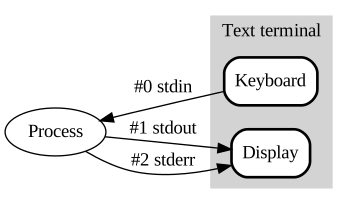
The three standard streams. Source
stdin,stdout,stderrWe are already using
stdinandstdout. We will introduce them in section File Processing
9.3 Formatting output with printf
"%s %d ..."format control string,%dconversion specifier
applications:
rounding, precision:
%.5ffixed-field width
%5dright-, left-aligning columns
%-5dalways show sign
%-dor reserve a space% dzero-padding
%05d
9.4 Printing integers
d,isame, signed decimal integeruunsigned decimal integerx,Xhexadecimalh,l,ll: length modifiers, short, long, long longz: length modifier forsize_t.therefore
%zu.
t: length modifier for pointer differencesa-btherefore
%td
ounsigned octal
9.5 Printing floating point numbers
e,E: exponential notation#include <math.h> #include <stdio.h> printf("%e\n", M_PI); printf("%E\n", M_PI);3.141593e+00 3.141593E+00f,F: fixed-point notationprintf("%f\n", M_PI); printf("%F\n", M_PI);3.141593 3.141593g, G: exponential or fixed-point based on magnitudeputs("6 is the default precision"); printf("%g\n", 1234.5689); printf("%g\n", 12345.6789); printf("%g\n", 123456.789); printf("%g\n", 1234567.89); printf("%g\n", 12345.0); puts("if exponent < -4, then E notation"); printf("%g\n", 0.00012345689); printf("%g\n", 0.000012345689);6 is the default precision 1234.57 12345.7 123457 1.23457e+06 12345 if exponent < -4, then E notation 0.000123457 1.23457e-05
9.6 Printing strings and characters
%c: character%s: string
9.7 Other conversion specifiers
%ppointer%%percent
9.8 Field width and precision
Field width
puts("With field width");
printf("%3d\n", 1);
printf("%3d\n", 12);
printf("%3d\n", 123);
printf("%3d\n", 1234);
With field width
1
12
123
1234puts("Without");
printf("%d\n", 1);
printf("%d\n", 12);
printf("%d\n", 123);
printf("%d\n", 1234);Without
1
12
123
1234Precision
printf("%.3d\n", 1);
printf("%.3d\n", 12);
printf("%.3d\n", 123);
printf("%.3d\n", 1234);
001
012
123
1234printf("%.3f\n", 1.0);
printf("%.3f\n", 1.2);
printf("%.3f\n", 1.23);
printf("%.3f\n", 1.234);
printf("%.3f\n", 1.2345);1.000
1.200
1.230
1.234
1.234Field width and precisions as arguments
printf("%*.*f\n", 0, 3, 1.0);
printf("%*.*f\n", 0, 4, 1.0);
printf("%*.*f\n", 10, 3, 1.0);
printf("%*.*f\n", 10, 4, 1.0);
1.000
1.0000
1.000
1.00009.9 printf format flags
-left align+show a plus#prefix0xto a hexadecimal value0pad with zeroes
9.10 Printing literals and escape sequences
Special characters used in format strings must be escaped, e.g.,
\\,\",\?[4]Other specials:
\nnewline,\thorizontal tab,\vvertical tab,\rcarriage return
9.11 Formatted input with scanf
Integer
d: optionally signed decimali: optionally signed decimal, octal or hexadecimalo: octalu: unsigned decimalx,%X: hexadecimalh,l,ll: indicate short, long, long long
Floating point:
e,E,f,g,Gfloating pointl,L:doubleorlong double
Characters and strings
c: Read a characters: Read a string
Scan set
[chars]scan a set of characters
char buffer3[] = "aeibaei";
char result[BUFFER_SIZE];
sscanf(buffer3, "%8[aei]", result);
result
(char[16]) "aei"char buffer4[] = "ccaeibaei";
sscanf(buffer4, "%8[^aei]", result);
result(char[16]) "cc"Others
ppointernstore the number of characters input%skip a percent sign
Skipping characters
char buffer5[] = "1-2";
int a, d;
sscanf(buffer5, "%d-%d", &a, &d);
d
(int) 2Suppression character *
sscanf(buffer5, "%d*%d", &a, &d);
d
(int) 29.12 Secure Programming
if
undefined behaviorin the spec, avoid it.
Why it is defined as one int is due to historical and backwards-compatibility reasons. C++ is newer than C and, a character literal is indeed 1 byte (
char). In the earlier days of C, functions with specific datatypes did not exist, so arguments were promoted toint. So at some point the standard body decided to make character literals directlyint.Due to this, we can write things like multi-character constants:
int c = 'abcd';
c
(int) 1633837924printf("%s", (char *)&c);dcbaWe could use a chain of macros, or build the string with
sprintf.According to https://
stackoverflow .com /a /501007. Other details: https:// www .gnu .org /software /gnulib /manual /html _node /strpbrk .html https://
man .archlinux .org /man /strpbrk .3 .en confirms that the naming is bad. Why must the question mark be escaped
\?: https://stackoverflow .com /a /19374879