Welcome 🤗! In the next ~4h we will cover:
Rubik’s Cube
Source Booyabazooka via Wikimedia Commons CC BY-SA 3.0
Before we begin with the class:
We need two Feedback persons. 👭
In case you are thinking about buying a license, try Copilot for work.
Thanks for Codeacademy tip 🤗! I added it as preparation for the next year. However it is very basic and free for only one hour, so we will continue to use the book as main source of learning, so please get a book!
If you have feedback til Classroom50, talk to me. For example, this issue was resolved after a student’s feedback. This is one of the superpowers of forges.
Answer the poll in 📊 Live poll: How much time did you spent for homework and preparation?
Test
(20 min)
Learning goals
Use simple input/output statements
Differentiate and use different data types
Explain that any nonzero value counts as true in C and predict the result of a condition (truthiness)
Draw a conceptual visualization of memory and explain what assignments do in memory using the visualization
Recognize the precedence of operators and use parentheses for explicit order
Write simple decision-making statements
Preparation review
E: Reading doubts?
Interactive review
Instructor goes through the list of concepts and demonstrates them in a live coding session.
Details
Demonstrate from the beginning:
Use the template at Important Links and create own repo.
Open a fresh terminal, clone the repo
Open the project and commit your changes
E: Review
E: Chat as a tutor
(5 min) Let us also try additional questions, e.g., on Copilot
Prompt
@Study

can you come up with 5 good multiple response MCQ with 5 answers similar to the common misconceptions here: [https://www.ic.unicamp.br/\~reltech/2018/18-06.pdf](https://www.ic.unicamp.br/~reltech/2018/18-06.pdf)

About the following concepts:

- 2.2
  - [ ] Comments
  - [ ] `#include` directive
  - [ ] `<stdio.h>` header
  - [ ] `main()` function
  - [ ] {term}`compiler`, linker and executable
  - [ ] `\n`, `\t`, `\"`
  - [ ] Indendation
  - [ ] `;` and statements
  - [ ] `{` and `}` (braces)
  - [ ] `printf`
- 2.3
  - [ ] Variable definition, e.g., `int x;`
    - [ ] Why do we need to define variables before using them?
    - [ ] What is an identifier?
    - [ ] Why should we choose meaningful variable names?
    - [ ] {term}`camel case` vs {term}`snake case` and which one is preferred in the book?
  - [ ] `&` operator used before variables in scanf
  - [ ] `scanf`
  - [ ] `%d` conversion specifier for `int` in `printf` and `scanf`
  - [ ] Why are many calculations performed in assignment statements (`=`)
- 2.4
  - [ ] Memory concepts, e.g., what happens in memory when you execute `sum = integer1 + integer2`
  - [ ] Does reading a value from memory change the value in memory? (destructive vs non-destructive[^microcontrollers-exception])
- 2.5
  - [ ] Arithmetic operators, e.g., `+`, `-`, `*`, `/`, `%`
  - [ ] Integer division, e.g., `5 / 2` evaluates to 2
  - [ ] Operator precedence, e.g., `*` and `/` have higher precedence than `+` and `-`, but parantheses win.
    - [ ] Why do we use redundant parantheses?
- 2.6
  - [ ] Selection (Decision making) `if` (without `else`, covered in next chapters)
  - [ ] Relational operators: `==`, `!=`, `<`, `>`, `<=`, `>=`
  - [ ] Why can't we use C keywords like `auto` or `if` as a variable name?
- 2.7 (optional)
  - [ ] Why should we use `puts()` instead of `printf()` for printing strings without formatting?

Do not show the answers right away and use a quiz widget if you support it.

I am from the following studies, so flavored questions from my own area are more welcome:

- https://student.dtu.dk/studieordninger/diplomingenioer/elektroteknologi/Studieordning
- https://student.dtu.dk/studieordninger/diplomingenioer/elektrisk-energiteknlogi/Studieordning
Student requests
compiler, linker, and executable
\tand\"Why we should use
printf("%s", string)orputs(string)instead ofprintf(string).
Demo unsecure printf
// Demonstration for reading a program's memory
// Steps:
// 1. Input "Hej!", it should print it.
// 2. Input "%x", it will show some cryptical data from your program's memory
// 3. Input "%s", it will show a random string from your program's memory
// 4. Input "%40$x". this outputs the 40th value on the memory (more precisely
// stack)
//
// In this example we cannot access the `secret`, but it still demonstrates that
// we can access data.

#include <stdio.h>

int main() {
  int secret = 0xDEADBEEF; // password

  // First version of your program
  printf("hi!\n");

  // Version 2
  // You introduce settings for different welcome messages
  char welcome_message_preference[100];
  scanf("%s", welcome_message_preference);
  printf("New welcome message is: ");
  printf(welcome_message_preference);
  printf("\n");

  // Version 3
  // fix
  // printf("%s", welcome_message_preference);
  // or puts, if an extra newline is ok
}
For the following input:
%sWe get:
hi!
%s
New welcome message is: New welcome message is:
Live Coding
(15 min) Write a program that reads two integers and prints:
sum
difference
quotient
remainder
Interesting questions:
Should we use
scanfor provide the values as variablesaandbin the code?
E: Calculating velocity and distance
E: Comparing sensor measurements
E: Converting seconds to hours, minutes, and seconds
Temperature check
How do you feel with C basics so far? 📊 Live poll
I feel confident and ready to move on to the next chapter.
I would rather have more exercises on the topics we have covered so far.
I don’t know
Coding environment continued
Submission from the editor
Find an assignment you have already accepted and which is not locked, or accept a new one, e.g., the next homework. Open its repository on GitHub.
Copy the address of your repository:
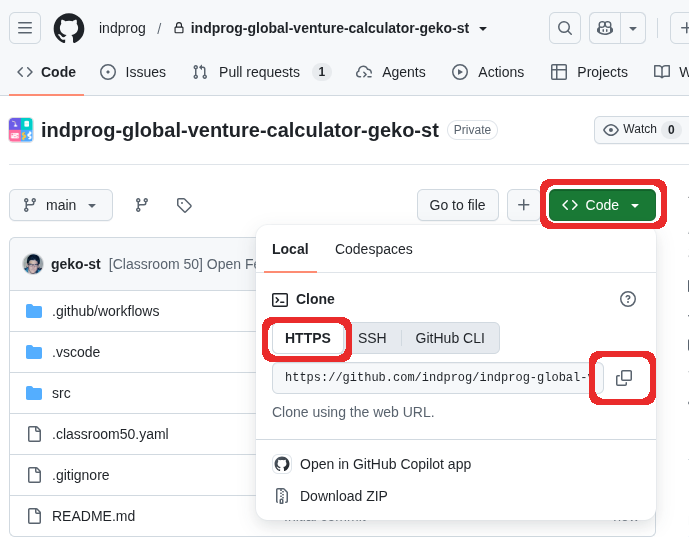
Open a terminal in your editor. In the terminal, change your directory to your
codefolder. For example:cd Desktop/uni/26WS/cprog/codeGet a copy of your repository on your computer using the address you copied before. This copy is also called clone:
git clone REPOSITORY_ADDRESSFor example:
git clone https://github.com/indprog/indprog-global-venture-calculator-geko-st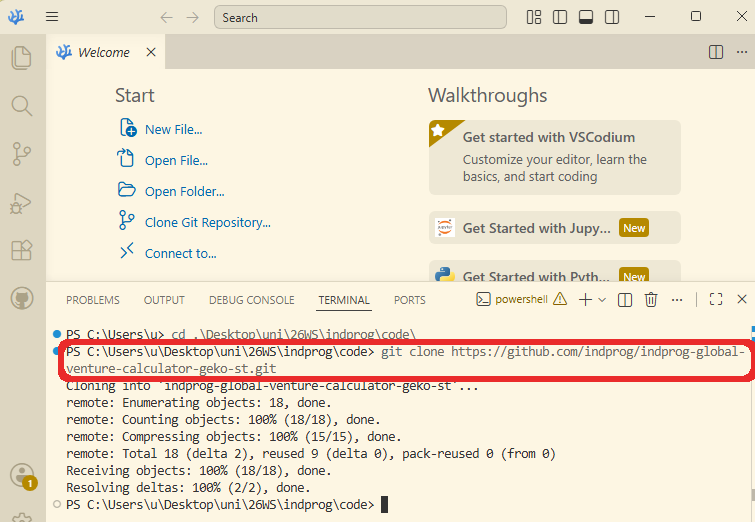
Open the folder you have cloned.
Make your changes in the files. For experimenting, change a file in
srcfolder.After modification you will see that the Source Control icon
 in the left panel has a number of changes[1].
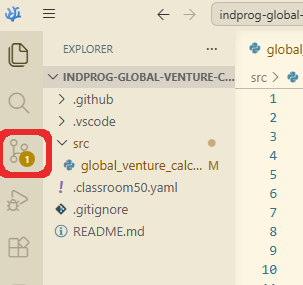
Click the Source Control icon
.(optional)You will see a list of all the files that have been modified. Check carefully, whether you have modified the correct files:
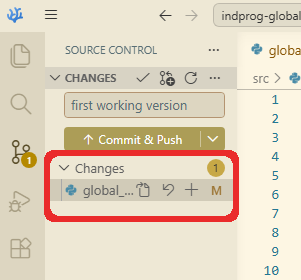
(optional)You can also get an overview of your changes by clicking on the file name:
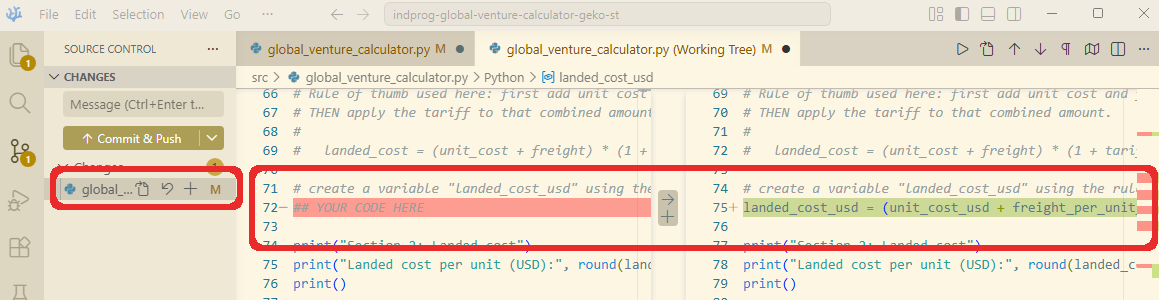
Write a short message that summarizes your changes, for example:
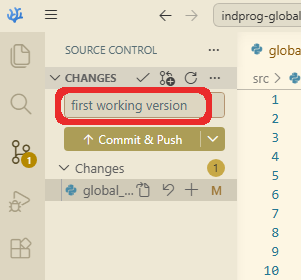
Click
 Commit & Push to send your changes to your repository on the cloud.
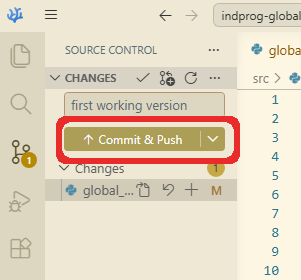
This will be also automatically a submission like you have done using the GitHub website.
You can check whether you have submitted or not by visiting your cloud repository or .
Why submission from the editor?
It is more convenient than uploading files manually.
E: Reflection
You also see a M in the file name in the Explorer, which indicates that the file has been modified. And a colorful circle octicon:circle-16 on the right of the folder, which has changes compared to the last commit.