Reading
(1-2h) Study Chapter 11 including exercise 10.4 (p. 570) with the learning goals in mind. The following section/s is/are optional:
11.13 Secure C programming
In the following you also find my own notes.
Learning goals
Give an example where you would use a file
Explain what sequential and random access means
List what kind of functions are required to access a file sequentially and randomly
Explain the difference between binary and text files
Explain how fixed-length records and
fseekallow reading or updating the n-th record without reading the whole file
11.1 Introduction
file for long-term data retention, RAM vs secondary storage, e.g., solid state drive
sequential- and random- access will be discussed
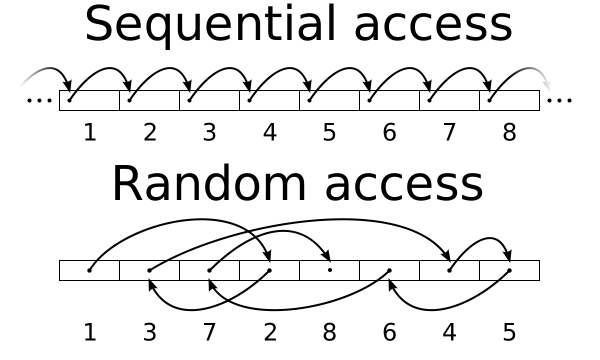
Sequential access is used on magnetic tapes, which are still in use. Modern drives support random and thus also sequential access.
11.2 Files and Streams
Standard streams
We used these streams with scanf and printf:
stdinstdout
stderr is new. Is used to distinguish between actual data and diagnostics data[1]
FILE structure
defined in <stdio.h>. FILE Includes
file descriptor: an integer index provided by the operating system (OS), that is linked to an open file table.
Each array element contains:
file control block: used by the OS to administer a file.
Relation between a stream (stdout etc) and FILE
After a file is opened with fopen, the program accesses it through a FILE * stream.
Functions
Basic:
fgetcfputc
String:
fgetsfputs
Formatted:
fscanffprintf
Binary (compared to text):
freadfwrite
11.3 Creating a sequential-access file
%main

#include <stdio.h>
FILE *fp = fopen("file.txt", "w");

fputs("Hello world!\n", fp);
fprintf(fp, "%s %s\n", "Hi", "planet");

fclose(fp);

puts("Written to file.");
Written to file.fputs,fprintffile version ofputsandprintfBUT: strangely
fputsdoes not add a newline compared toputs[2]
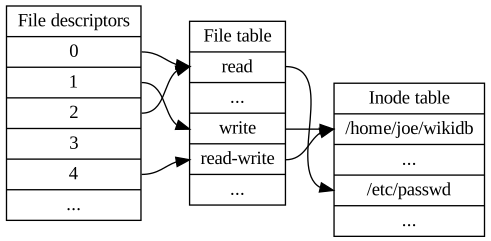
FILE contains a file descriptor, which is tied to a file table entry in the operating system (OS). File table and inode table are part of the OS. OS helps the processes to coordinate concurrent read/write operations.
Qwertyus, CC-BY SA 4.0, Source
Opening Modes
rreadwwrite, discard current contents if the file existsaappendr+read and write to existing filew+write and read, if file exists, discard contentsa+append and read*b,*b+binary versions of the abovew*xexclusive write
Text and binary modes behave the same on Linux and MacOS
On Windows, text mode translates \r\n to \n on read and \n to \r\n on write.
This applies to C, but not Python, for example. In Python there is a difference between text and binary modes on all platforms. For example:
#include <stdio.h>

int main() {
  FILE *fp = fopen("data.txt", "w");
  fputs("Line1\n"
        "Line2",
        fp);
  printf("data.txt size: %ld bytes\n", ftell(fp));
  fclose(fp);

  fp = fopen("data.bin", "wb");
  fputs("Line1\n"
        "Line2",
        fp);
  printf("data.bin size: %ld bytes\n", ftell(fp));
  fclose(fp);
}
Output:
On Linux:
data.txt size: 11 bytes
data.bin size: 11 bytes
On Windows:
data.txt size: 12 bytes
data.bin size: 11 bytes
Details: https://
Checking file open operation
%main
#include <stdlib.h>

FILE *fp = fopen("WRONG_FILE_NAME", "r");
if (!fp)
    perror("fopen");
fopen: No such file or directory11.4 Reading data from a sequential-access file
Hello world!
Hi planet
%main

constexpr size_t STR_SIZE = 16;
FILE *fp = fopen("file.txt", "r");
char word1[STR_SIZE], word2[STR_SIZE];

while (fscanf(fp, "%s %s", word1, word2) == 2)
  printf("%s %s\n", word1, word2);

fclose(fp);
Hello world!
Hi planetReset file position pointer
fseekshould be used instead ofrewind
Updating a sequential file
Requires replacing all the contents after the modification position.
11.5 Random access files
important for large datasets
approach: fixed-length records similar to arrays (incl. arrays of structs)
11.6 Creating a random-access file
#include <stdio.h>
constexpr size_t NAME_SIZE = 16;

typedef struct {
  char name[NAME_SIZE];
  int id, birth_year;
} Student;

FILE *fp = fopen("database.dat", "wb");
auto student1 = (Student){"Sisi", 266592, 2003};
auto student2 = (Student){"Aman", 221935, 2001};
fwrite(&student1, sizeof(Student), 1, fp);
fwrite(&student2, sizeof(Student), 1, fp);
fclose(fp)
(int) 0Writing an array
fwrite’s signature is designed to write arrays:
fwrite(arr, sizeof arr[0], countof arr, fp)
Instead of
fwrite(.., .., 1, ..)
11.7 Random-access write
fseek
After fwrite, assume we want to modify student2
fp = fopen("database.dat", "rb+");
fseek(fp, 1 * sizeof(Student), SEEK_SET);
Student students[] = {student1, student2};
fwrite(students, sizeof(Student), 2, fp);
fclose(fp)
(int) 0You should see that student2’s data is zeroed.
if we use
wb, then the whole file is overwritten with zeroes. The last argumentwhencestands for: from where, from which place or source.So
whencesets from which place (start point) do we seek?
11.8 Random-access read
Similar, but fread
11.9 Case study
bank transaction-processing system
11.10 Secure programming
fprintf_sandfscanf_sfopenwrite zeroes the file (truncate), if it exists. Usewxto avoid thisfseekshould be used instead ofrewind, becauserewinddoes not return any value.Favor text formats like
JSONover binary data, because data alignment can differ between compilers and platformsWhen working with binary files,
SEEK_ENDmay not work. UseSEEK_SETClose a file, as soon as its not needed anymore.
modern languages like Python solve this by:
with open("file") as f:
    f.read()
    # process data

print("Continue")
The file is closed automatically when
withis left.